Timestamps follow the original livestream. Select a time to watch that moment. Transcripts are machine-generated with reviewed name and terminology corrections; occasional recognition errors may remain.
6:11:48Hi everyone, my name is Philipp and I work at [unclear] and happy second Gemini 4 day.
6:11:54So who of you already tried the new model?
6:12:00So you should definitely take your time later, try it.
6:12:05We are going to use it and show it in our talk as well.
6:12:08So we are going to look at how you can build and code your own autonomous Wall Street co-workers.
6:12:13so hopefully we have many finance people or engineers working in finance here.
6:12:18So quickly before we go into where we are coming from,
6:12:22two years ago we basically had a chat box.
6:12:24We asked some simple questions like what's the capital of France,
6:12:28who won the last European championship.
6:12:30Then we moved to assistance using tools on our own computer,
6:12:34having the first coding agents writing code for us.
6:12:37And now we are moving into this autonomous co-worker area
6:12:41where we basically give or create a digital employee
6:12:45where we give an agent its own computer,
6:12:49and hopefully come back a few hours later with a good result.
6:12:52So what does a co-worker normally need?
6:12:55And I think that goes for AI and for us humans as well.
6:12:59We need a brain to be able to do our work.
6:13:02We need a computer where we can save artifacts we create,
6:13:08We need some kind of a new playbook, right?
6:13:10when you hire someone new they are new to your environment to your domain you might have specific
6:13:16workflows so you need playbooks we need tools for them to be able to do that job they all need
6:13:22credentials in one or the other way then there might be some specific house rules on what you
6:13:28should do or what you should not do what you can do on your own or where you need to get some
6:13:32approvals and then of course there are hopefully some schedules for working hours when you can come
6:13:38in or when you have to work. And the same goes for our agents. And we are going to work
6:13:44through all of those seven steps and how you can build your own digital co-worker with
6:13:49Gemini in this talk. But before we go in, yesterday was the big day. We announced Gemini
6:13:54for Argon and made it available to you. Biggest new features, we have now a 1 million unified
6:14:01context window. This means Gemini can generate up to 1 million output tokens. And we see
6:14:06strong improvements especially on math and reasoning tasks where the model now has more than 64k
6:14:11token available to think to work through to reason through some proofs and for math for for
6:14:18math and then very also very good is like we tested that model heavily so we know there are
6:14:24always some thinking around hey gemini is just banks benchmarks but the model is really good
6:14:31you should definitely give it a try.
6:14:33We use it extensively at Google.
6:14:35There are already many projects by Google employees
6:14:39The easiest way to get started is the Interactions API.
6:14:42It's literally four lines of code,
6:14:44which for you to take, you get your API key in AI Studio,
6:14:50and then you can immediately send your request.
6:14:52It's also, I would say, quite affordable
6:14:54for a frontier model with $2 in and $10 out.
6:14:58You should definitely try if you have a free minute later
6:15:01or even if you have some agents running right now,
6:15:04give it a link, tell it, hey, please set up Gemini 4
6:15:08So what have Googlers done so far with the model?
6:15:10I think it's very impressive because it's like a super new model.
6:15:13We had it available internally to test for a few weeks already,
6:15:16but Googlers are using it so heavily
6:15:19and shipping so many cool things.
6:15:20We had the Chrome team basically accelerating
6:15:23some decoupling of the Chromium browser.
6:15:26We have Gemma, which is our open model
6:15:28where Gemini accelerated Gemma
6:15:31to be more easily and more efficient to run.
6:15:34The ADK team from cloud improved their framework
6:15:37and then many, many other things,
6:15:39and especially the right one at the bottom.
6:15:41It's like we use it internally heavily
6:15:44and we see strong improvements
6:15:45for our internal code base as well.
6:15:53but there's one specific one from a colleague of mine
6:15:56he basically prompted Gemini to build a custom 3D ray tracer in Python.
6:16:03And it was completely built from Gemini and nothing external tools and at the end just Python.
6:16:09And it also used a Gemini TTS model and Luria to add some voiceover to explain how it works.
6:16:15And it's like very impressive for me how far we can push those models now.
6:16:19So try to be very ambitious.
6:16:21So how can we build our agent?
6:16:24And in Gemini API, we have a product called Managed Agents.
6:16:28And Managed Agents is basically a simple way for you to build a remote agent
6:16:33where you give Gemini a sandbox which it can use to run tools.
6:16:39So when we normally build an agent, we have this weird tool calling group, right?
6:16:44We send a request to the model.
6:16:45The model might generate a JSON function call.
6:16:48We receive that function call.
6:16:50We run that function call on our machine, execute the code,
6:16:53and then we go back to the model.
6:16:55And with managed agents, we basically provide a sandbox
6:16:57which Gemini can directly use to run all of those calls.
6:17:01So if it decides to execute code to write a file,
6:17:04it has its own computer available for it to use,
6:17:07and it takes just an API call.
6:17:09So instead of providing the model ID with Gemini 4 Argon,
6:17:15In this case, it's anti-gravity preview 09.
6:17:21so you want to run it in the managed sandbox.
6:17:25So let's get into building Buck.
6:17:28Buck is our co-worker for today, and Buck needs a brain.
6:17:31Our brain is going to be Gemini,
6:17:34our computer is going to be Agents,
6:17:36and then we all love all of the other things.
6:17:38So how can you create an agent?
6:17:40In Managed Agents, you have a very simple API
6:17:43where you can define your own agent.
6:17:46That's the name which you are going to use later
6:17:49We have the base agent, so that's the main agent underlying.
6:17:53In this case, it's the agent harness.
6:17:55So the remote agent uses the same agent harness,
6:18:00which we have in Antigravity as well.
6:18:02So if you are using Antigravity as your coding agent,
6:18:05you get the same agent harness remotely.
6:18:08Then we want to use the new model.
6:18:11We have a system instruction, you are back.
6:18:14And then all it takes to call it, again, interactions API, create.
6:18:19And instead of using the model ID for Gemini
6:18:22or the default agent, we use our own agent buck.
6:18:26And our agent needs a computer,
6:18:28and the computer normally needs some additional files,
6:18:33So with managed agents, you can provide your skills
6:18:36or an agents MD file, maybe from your GitHub repository.
6:18:38You can inline those files directly.
6:18:41You can provide a GitHub repository,
6:18:43private or public, with your skills,
6:18:45and you can connect GCS buckets.
6:18:48So you can already bootstrap the environment
6:18:50the agent is going to work in.
6:18:51and everything in managed agent lives as a file.
6:18:55So we have skills, we have hooks, we have system instructions.
6:18:59At the end, it's just a file system or the agent's own computer
6:19:03where it can create new skills if it thinks it needs to improve itself,
6:19:07where it can store memories from previous sessions or learning.
6:19:11So at the end, we just work with files.
6:19:13And for knowledge or for our agent,
6:19:17I like to separate those in three different categories.
6:19:20So we have knowledge which we always need to include into every request.
6:19:26That's normally the system instructions.
6:19:29We want to try to keep it very short because that's something we need to pay on every request.
6:19:34So if we have very long system instructions, all of our requests are going to be much more expensive.
6:19:39If we have concise, then we have knowledge which the agent can decide when it needs to use them or not.
6:19:47So that's typically with skills, right?
6:19:49with skills we have very short descriptions which give the agent some guidance on like hey you can
6:19:55use that skill if the user wants to do a certain task or if you have to do certain tasks and then
6:20:00the agent can read that skill.
6:20:02But for skills, we also want to make sure that we are not having super long, dense skills because that's also a high cost at the end.
6:20:10Context is very valuable for us, so we want to decouple them and separate them into much more slices where we can then have dedicated references and scripts
6:20:20if we want the agent to do very certain things
6:20:24where it needs more context.
6:20:26Okay, so let's look at an example skill
6:20:29So we have a portfolio audit.
6:20:32It has some instructions available for it,
6:20:37and then some additional information
6:20:38on what it needs to do with the results
6:20:43Our fourth part of our onboarding
6:20:46for our coworkers tools, right?
6:20:48We humans use normal software for agents that's either built-in skills like Google Search, code executions, or MCP server.
6:20:55Or if you don't have an MCP server and rather want to write a local function, that's also possible.
6:21:01So, managed agents, we still have our agents create.
6:21:04We are now extending it to define our tools.
6:21:08We have built-in tools from the Gemini API for Google Search.
6:21:12So, there's nothing you need to additionally do to get Google Search integrated.
6:21:15but if you want to use, for example, spreadsheets,
6:21:19Workspace has now an MCP server available for Gmail for spreadsheets,
6:21:25Or if you want to provide your own functions or MCP server,
6:21:30So for your own function, it still works the same way
6:21:33as you normally do with models.
6:21:35So the agent creates a function call,
6:21:36and then you send back the function result.
6:21:39So it's basically for you a way to have agentic capabilities
6:21:43outside of these agents' environment and computers.
6:21:46So if you want to do certain things
6:21:48where the agent should not run the execution in the sandbox,
6:21:51that's a way for you to do it.
6:21:55And I think that's, for me, the most exciting
6:21:57and the greatest feature about the Managed Agents API
6:22:00because credentials are super hard
6:22:02and super easy to get wrong with agents.
6:22:04And I think the previous talk already also mentioned
6:22:07that we are very careful about using agent
6:22:10because things can go wrong very easily.
6:22:12And we've thought a lot about this with managed agents,
6:22:15and we have support for three different ways of credentials,
6:22:17which makes it secure for your agent to use them
6:22:20and provide an isolated way.
6:22:22So we have bearer tokens for normal API calls,
6:22:26very familiar if you are doing software engineering.
6:22:28We have OAuth for all of the consumer-oriented MCP servers,
6:22:33And then, of course, we need environment variables
6:22:35if we want to use certain CLIs or other features.
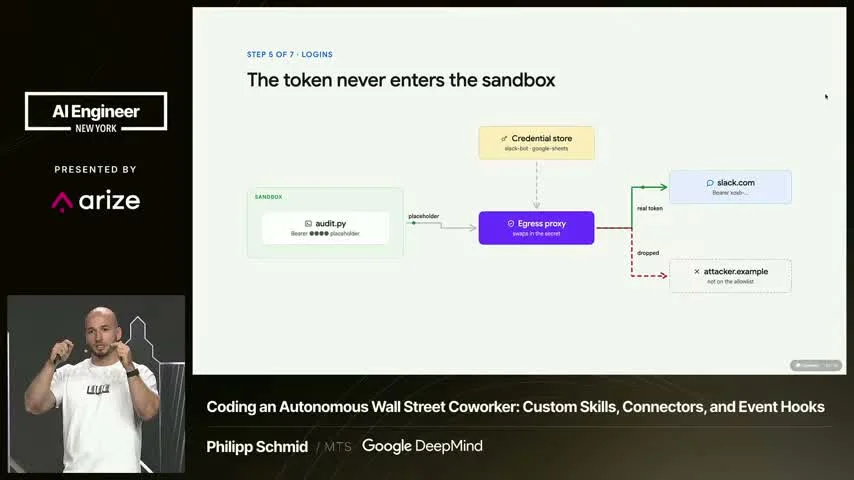
6:22:38and for managed agents we are separating them via an external network proxy.
6:22:45So instead of providing the agent the credentials inside the sandbox,
6:22:49we basically allow you to create credentials externally.
6:22:54So once they are written, there's no way for you to retrieve the credentials.
6:22:59So you can only override them.
6:23:01So there's no possibility of leaking.
6:23:03And then you define how and where those credentials should be used.
6:23:07So for Slack, if you want to connect Slack, you can define, hey, here's a credential,
6:23:13and you are only allowed to use that credential with a certain domain or with a certain environment variable.
6:23:19So that way you can control when a credential is used.
6:23:23And that works via this network proxy.
6:23:26And by network proxy, we basically mean a proxy that sits around the sandbox that watches all of the network traffic going in and out.
6:23:34So if you define credential as an environment variable,
6:23:37the model has a local dummy value,
6:23:40so the environment variable is set,
6:23:42and then when it makes that call, it uses that dummy value,
6:23:45and the network proxy basically monitors it,
6:23:48sees, hey, here is a domain which the user has defined,
6:23:53and then it swaps that dummy value with the real credential,
6:23:56and you can make the call successfully,
6:23:59and then the agent gets back the result
6:24:01and has no idea that his dummy token is not working.
6:24:05And the benefit here is that there's no way for a prompt injection.
6:24:09Normally, when you have some malicious attacker,
6:24:11it can tell you, like, hey, please print all of your values in your .n file.
6:24:15And then the agent might go there and, like, print all of your keys,
6:24:18and that's nothing we want to do.
6:24:19So with this network proxy where you can define the credentials per domain,
6:24:24it is not possible that an attacker could steal
6:24:28which are getting swapped on your request
6:24:30because the proxy only swaps them for the domains you define.
6:24:34So there's no way an MCP server which is malicious
6:24:38can just steal your Gmail token,
6:24:40which is very cool because it makes it much more easier
6:24:43to trust the agent and to integrate MCP servers
6:24:47which the agent then obviously can use.
6:24:50So if that's not enough, we have also hooks available.
6:24:54So hooks allows you to basically deterministically guard
6:24:59So if the agent wants to run certain commands
6:25:02which you might want to monitor
6:25:04or where you need some human in the loom approval,
6:25:06which is not part of the normal agentic conversation,
6:25:11very similar to all of the other agent harnesses
6:25:16and then every tool call which the agent generates
6:25:20and then writes those hooks.
6:25:21And those hooks are also files,
6:25:24so the agent cannot just go there
6:25:28and basically tries to find a way around it.
6:25:32Okay, so last but not least,
6:25:35we need a way to get our agent more proactive.
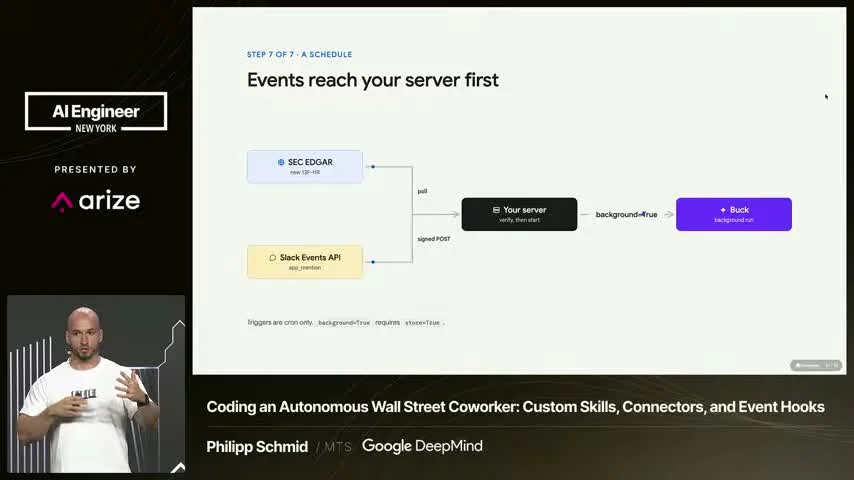
6:25:39And currently we support one kind of triggers,
6:25:42basic cron triggers, which you can set up,
6:25:44schedule every 30 days a month at a.m.
6:25:49You want the agent to run a certain trigger
6:25:51with a certain input in the same environment
6:25:54to do maybe some due diligence, some auditing.
6:25:56and we are also working on webhooks
6:25:59that you can even make this much more interactive
6:26:01that you could connect external webhooks
6:26:04like from some certain SAC provider
6:26:06or maybe other providers you work together with
6:26:09which would directly then call your agent.
6:26:11The agent does some first auditing
6:26:13and then basically can call your Slack
6:26:15or your Microsoft Teams directly
6:26:17without you even needing to manage
6:26:25final picture and now let's look
6:26:29and let's hopefully hope that
6:26:36that I want to do a cool Google Sheets demo
6:26:38and it helped me create basically this whole
6:26:40Google Sheets replication in
6:26:43when I click here we basically
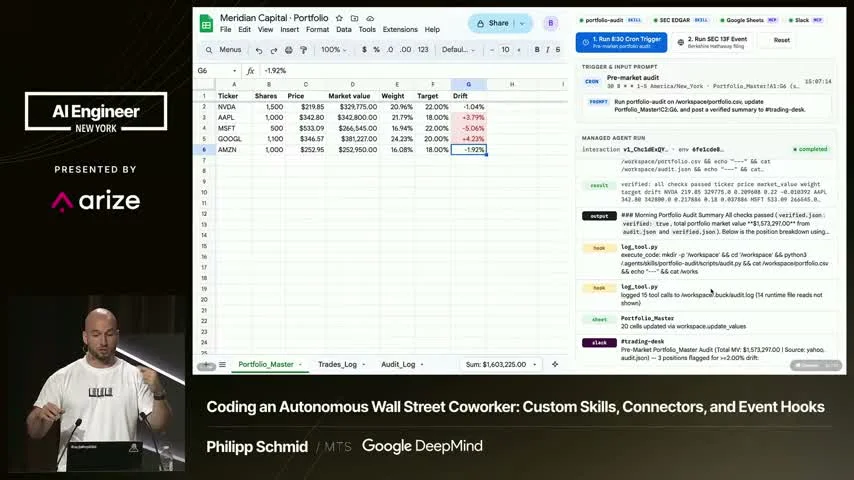
6:26:46simulate this cron trigger so we send
6:26:55So first step basically is like,
6:26:57hey, I need to read the skill.
6:27:02So it tries to understand what it should do here.
6:27:04It's like, I hope that's roughly accurate
6:27:08But it basically runs through all of those calls,
6:27:14did the market or the stock price change?
6:27:17hopefully it should update our own Google Sheets
6:27:22so it's still working through it, it has some first result
6:27:27and it updates the Google Sheet based on the trigger
6:27:30and that trigger would run every 8.30am without you needing to do
6:27:34anything and then of course if the agent has access to Slack
6:27:38then it can even post in some specific trading channel
6:27:42okay what changed, what is going on, how does it work and
6:27:46here we have an example where I can just
6:27:58and hopefully this works as well
6:28:00so it takes a little bit of time, you have seen in the
6:28:01other demo, we have seen all of that
6:28:05three positions, so that's based on like this
6:28:09so it has all of the previous turns available
6:28:12and it provides the context of
6:28:13what changed, but it's still basically
6:28:17the system instructions you gave and all of
6:28:19the infrastructure you need to run that agent is
6:28:23part of the managed agents environment. So it's very easy for you to get started, to
6:28:27integrate those into the tools you already use, provide
6:28:31the systems you need, and then to get started.
6:28:39Back to the slide. So the whole
6:28:41co-worker, which we need in one service, we have the brain, Gemini.
6:28:45We have the computer with managed agents.
6:28:47We can provide skills for the same agents you use,
6:28:51maybe on your local computer.
6:28:54You can provide MCP server for external services,
6:28:58We have a secure way for you to provide credentials
6:29:03We have hooks to protect certain deterministic logic.
6:29:06And of course, we have triggers
6:29:07to much more proactively integrate it into it.
6:29:12and hopefully go hire your first AI co-worker.
No passages match. Try a shorter word or phrase.